
MyBiz app
Multiple Login Feature
Introduction
Project Overview
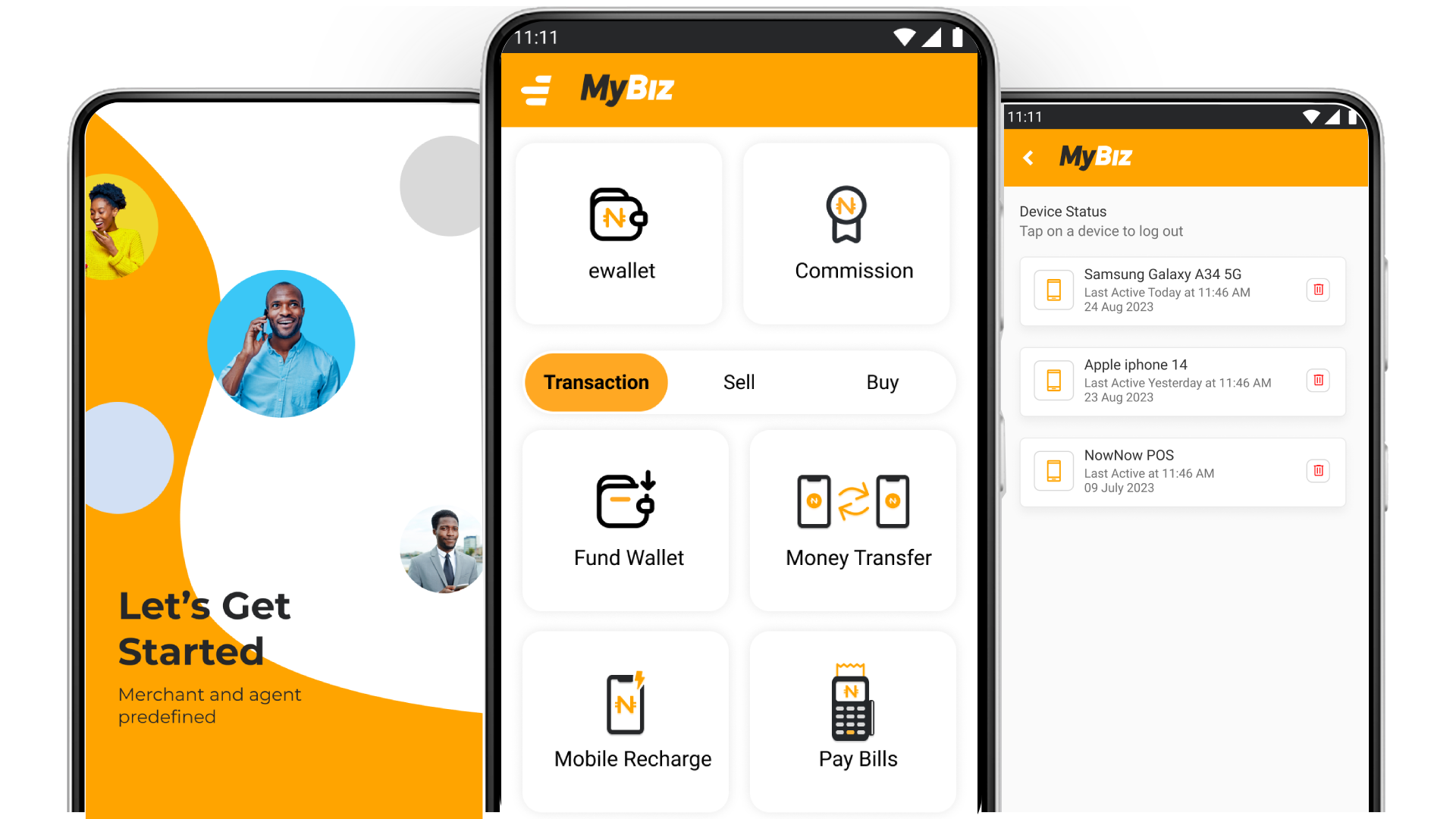
MyBiz is a cutting-edge fintech app by NowNow, designed to simplify financial transactions for users in Nigeria. It offers seamless money transfers, mobile and bill payments, loans, and Buy Now Pay Later (BNPL) options. The app also features Agent Mode for facilitating transactions, empowering both individuals and businesses with secure, efficient, and accessible financial solutions.
My Role
UX Designer (User Research, Visual design, Interaction design, Usability testing)
Tools
Figma, FigJam, miro
Duration
2 Weeks
Problem Statement
Agents are busy professionals who need the ability to log in to both the mobile application and the POS device concurrently because the current limitation disrupts their workflow, preventing them from efficiently serving customers and managing transactions seamlessly.
Goal Statement
Our MyBiz app will let agents log in to both the mobile application and POS device concurrently, which will affect agents and their customers by improving transaction efficiency, enhancing customer service, and streamlining operations. We will measure effectiveness by tracking the reduction in transaction processing time and increased agent satisfaction through feedback surveys and performance metrics.
Business Opportunities/Needs
- Resolve Concurrent Login Issue: Enable agents to log in to both the mobile app and POS device simultaneously to improve operational efficiency.
- Expand User Base: Target small businesses and individuals in Nigeria yet to adopt digital finance solutions.
- Increase Agent Productivity: Allow agents to manage transactions on both the mobile app and POS device concurrently, enhancing service speed and efficiency.
- Improve Customer Experience: Faster processing on both the app and POS device will reduce wait times and improve overall service quality for customers.
- Boost Agent Satisfaction: Resolving the login issue across both the app and POS devices will reduce frustrations and improve agent retention.
Research
Research Goals
- Identify Agent Pain Points: Understand the specific challenges agents face when using both the mobile app and POS device, especially regarding concurrent login limitations.
- Evaluate User Satisfaction: Measure agent and customer satisfaction with the current MyBiz transaction process and identify areas for improvement.
- Assess Workflow Efficiency: Analyze how the inability to log in on both devices impacts agent productivity and the smoothness of transaction flows.
- Understand Customer Experience Impact: Determine how the concurrent login issue affects customer wait times and overall satisfaction with MyBiz services.
- Validate Feature Needs: Confirm whether concurrent login capabilities are a high-priority need for agents and if additional features are desired.
Research Methodology
- Secondary Research (Competitive Analysis)
- Primary Research (User Interview)
Secondary Research Competitive Analysis
| Competitor | Type | Strength | Weekness |
|---|---|---|---|
| OPay | Direct |
|
|
| Paga | Direct |
|
|
| Indirect |
|
|
Improvement Opportunities Based on Competitive Analysis
- Develop Robust Multi-Device Login Support: Build a strong concurrent login feature for MyBiz, allowing agents to log into both the mobile app and POS devices seamlessly—meeting a key need that competitors have yet to fully address.
- Enhance Offline Functionality: Implement offline support for agents working in low-connectivity areas, increasing reliability for transactions and customer service where competitors like WhatsApp excel in accessibility but lack financial integration.
- Optimize Real-Time Data Sync: Ensure that MyBiz provides fast, reliable data syncing across devices, improving transaction speed and accuracy for agents, where competitors face delays or inconsistencies.
Primary Research User Interview
Prior written consent is required to record an interview, so be sure to attach a consent form to the email. If the participant is a minor or unable to consent under applicable law, then written consent is required from the participant's parent or guardian.
UX Research consent form.
After gaining a general market understanding, I engaged directly with users to gather insights on the multiple login feature. I developed an Interview Guide with 6 open-ended questions, interviewing 10 participants (6 males, 4 females) to understand their needs and expectations for seamless login across mobile and POS devices.
Empathy Map
Says
The main issue is that I can't be logged into both at once.
It would be helpful if I could log out from one device and keep the other one active, depending on where I am.
If I could log into both devices at the same time, it would save me time and reduce errors
I'm concerned about security and unauthorized access if I log into both devices.
Think
It would be great to choose where to log out—like all devices or just one—depending on the situation.s
I wonder if logging into both devices at the same time would lead to security vulnerabilities
Having both devices synced in real-time would make my work more efficient.
I wish the login process could be faster and more secure across multiple devices.
Does
Logs into the MyBiz app on a mobile device for transactions.
Switches to the POS device for payments, often needing to log out of one device to access the other.
Looks for ways to streamline the process and reduce the back-and-forth between devices.
Logs in at various times and locations, sometimes needing a quicker login process when on the go.
Feels
Frustrated by the need to log in and out of devices constantly.
Stressed when unable to perform tasks efficiently due to device login issues.
Hopeful for a solution that will allow easier and simultaneous access to both devices.
Confused at times when logging out of one device unexpectedly logs out of both devices.
Relieved when there's an option to log out from just one device, maintaining access on the other device.
User Persona
Pain Points
How Might We
Insight
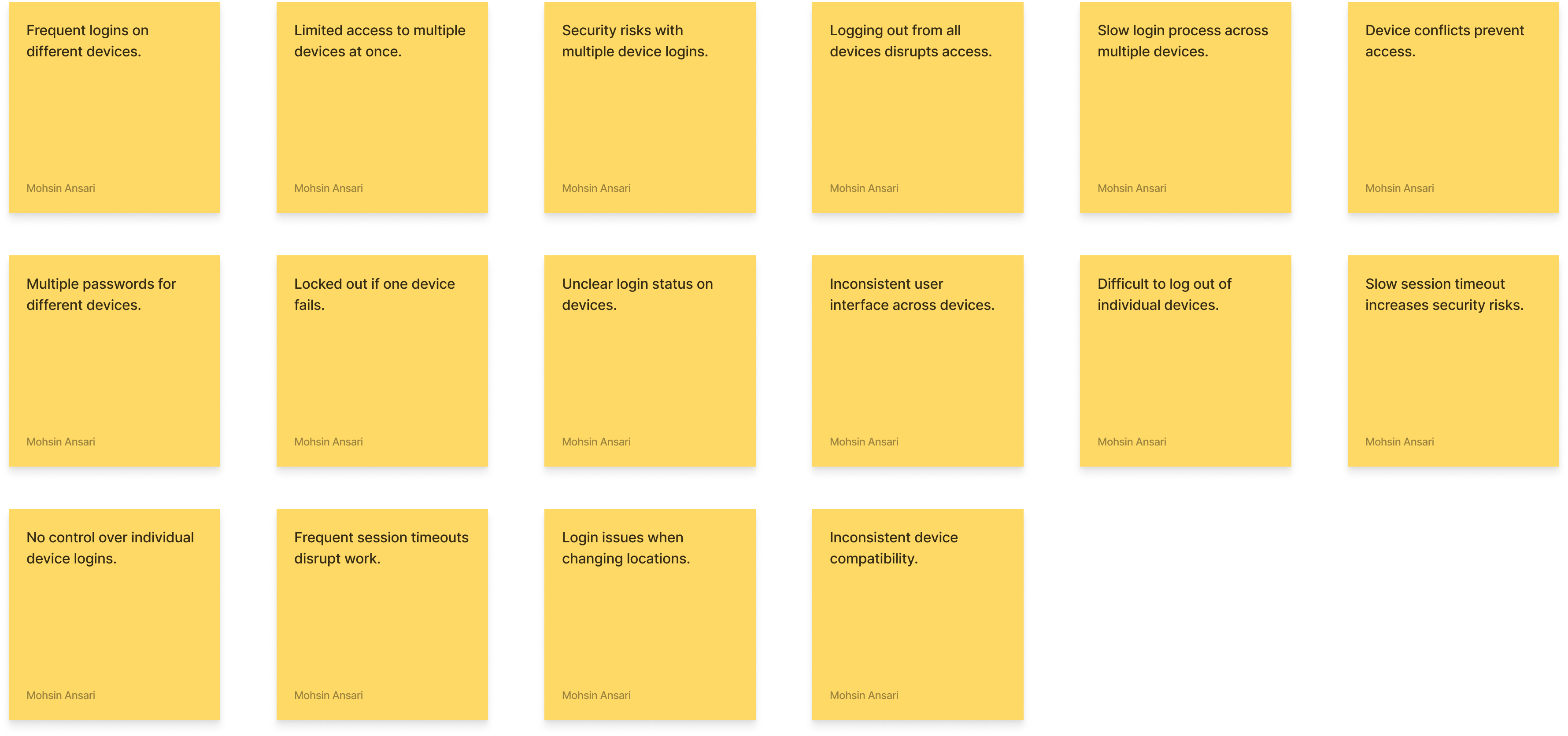
Users need seamless access to MyBiz on multiple devices without delays or security concerns, as the current login system causes frustration and inefficiency.
Needs
- Multiple device logins without constant logouts.
- Control over individual device logins.
- Quick, secure login process.
- Clear visibility of device login status.
POV
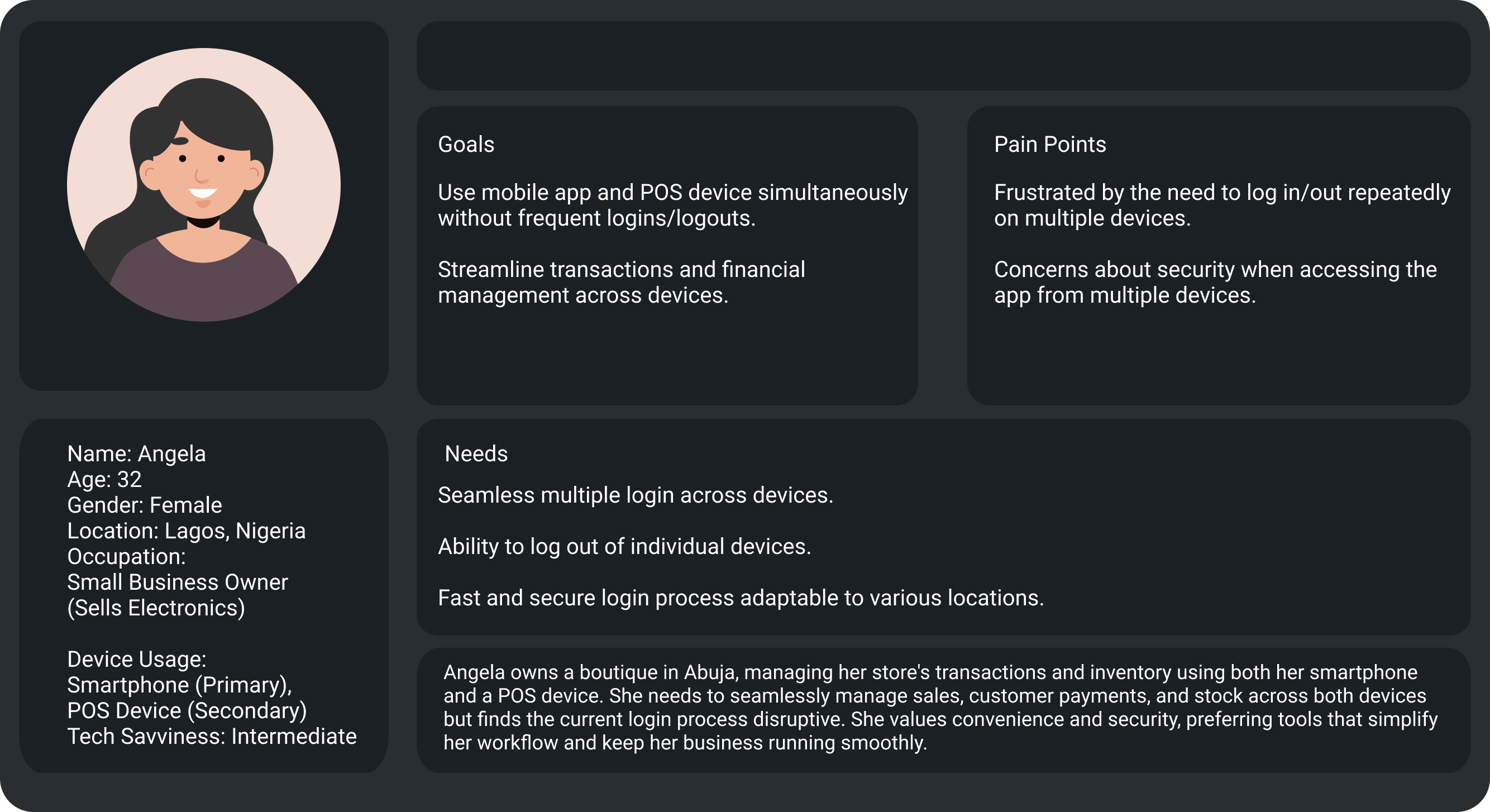
Angela, a business owner, needs to manage transactions across devices without losing time or data consistency, as the current process slows her down.
How Might We
- How might we display a list of all devices currently logged in to improve transparency?
- How might we display device status for transparency on active logins?
- How might we integrate location tracking for device security?
- How might we show login times for each device to help monitor activity?
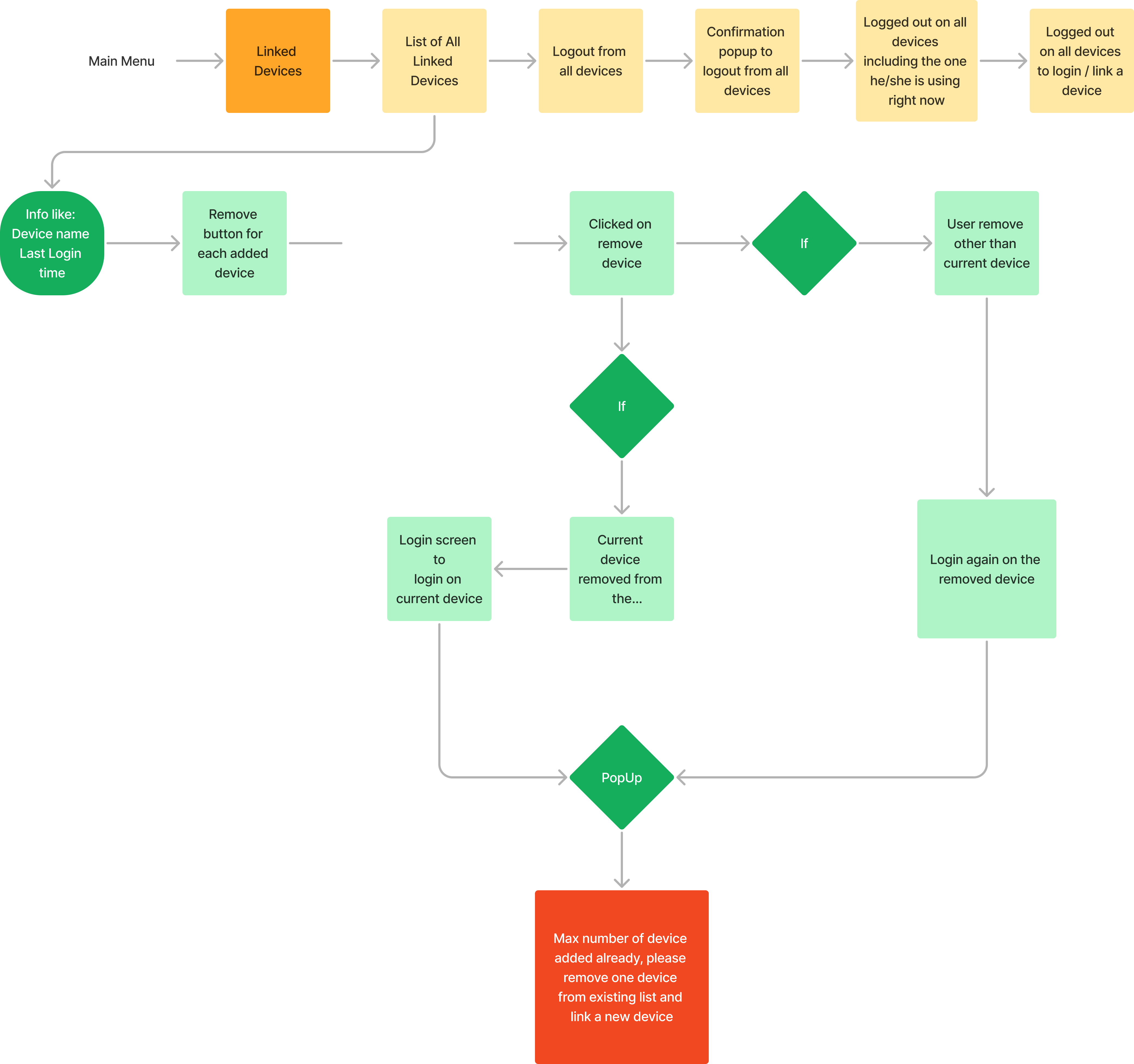
- How might we allow control over individual device logins?
User Flow
Ideate Lo-fi Wireframe
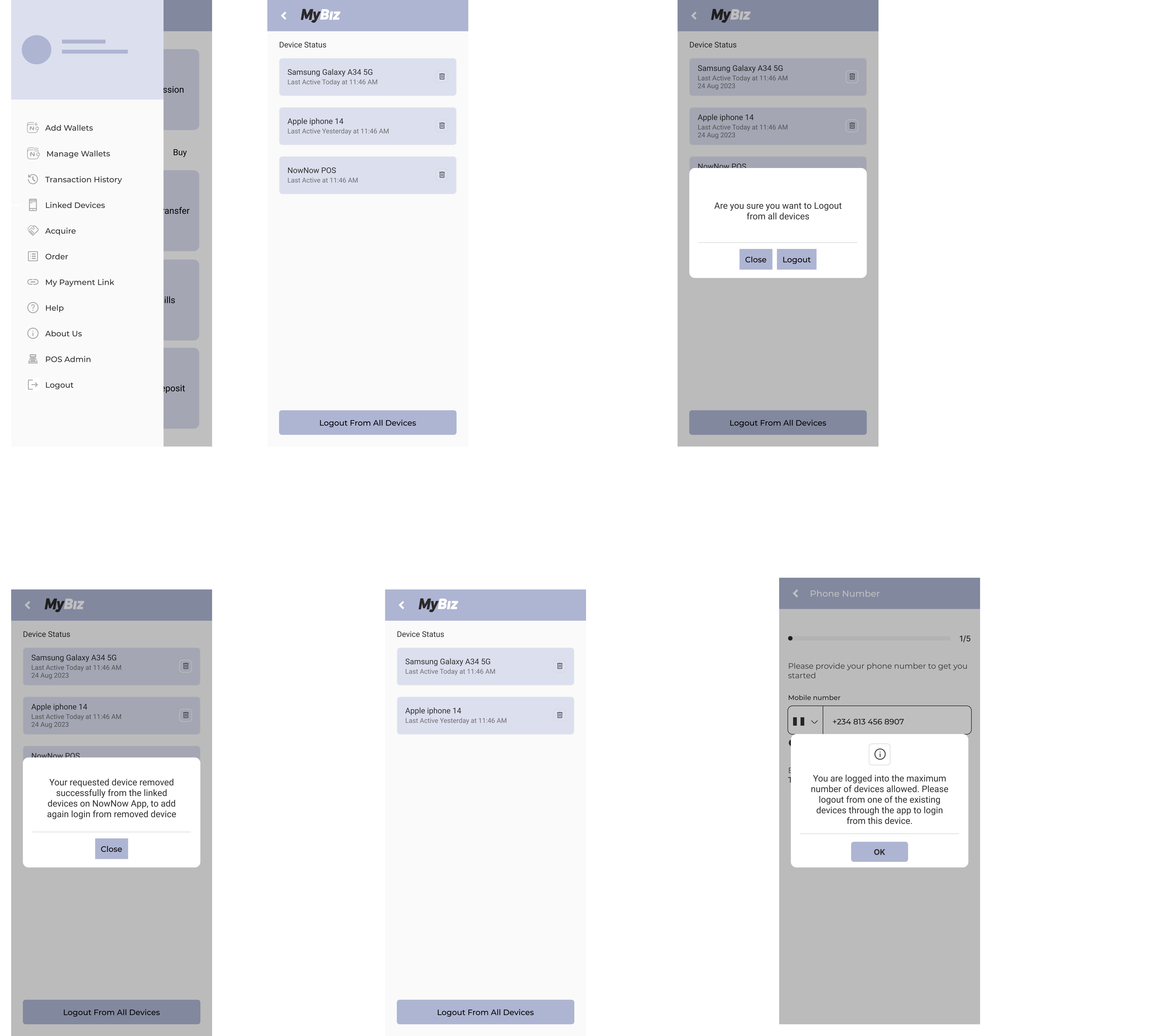
Test Usability Study
Effective usability testing requires a well-defined Research Plan , including test Project background, participant, Stakeholders profiles, chosen methodologies, KPIs, and scripts. To ensure a comprehensive approach, I have created a usability testing plan that details our testing aims, scope, and preparation strategies.
In UX design, a digital wireframe is a visual guide that represents the layout and structure of a user interface. It's a low-fidelity, often grayscale design used to outline the basic elements and functionality of a digital product before adding detailed design elements or high-fidelity visuals.
Conduct Usability Testing
I conducted usability testing with five participants for the multiple login feature in the MyBiz app, recording their mistakes, observations, quotes, and task completion. The goal was to identify usability issues and gather data to improve the feature's user experience across devices. note-taking spreadsheet
Affinity Diagram
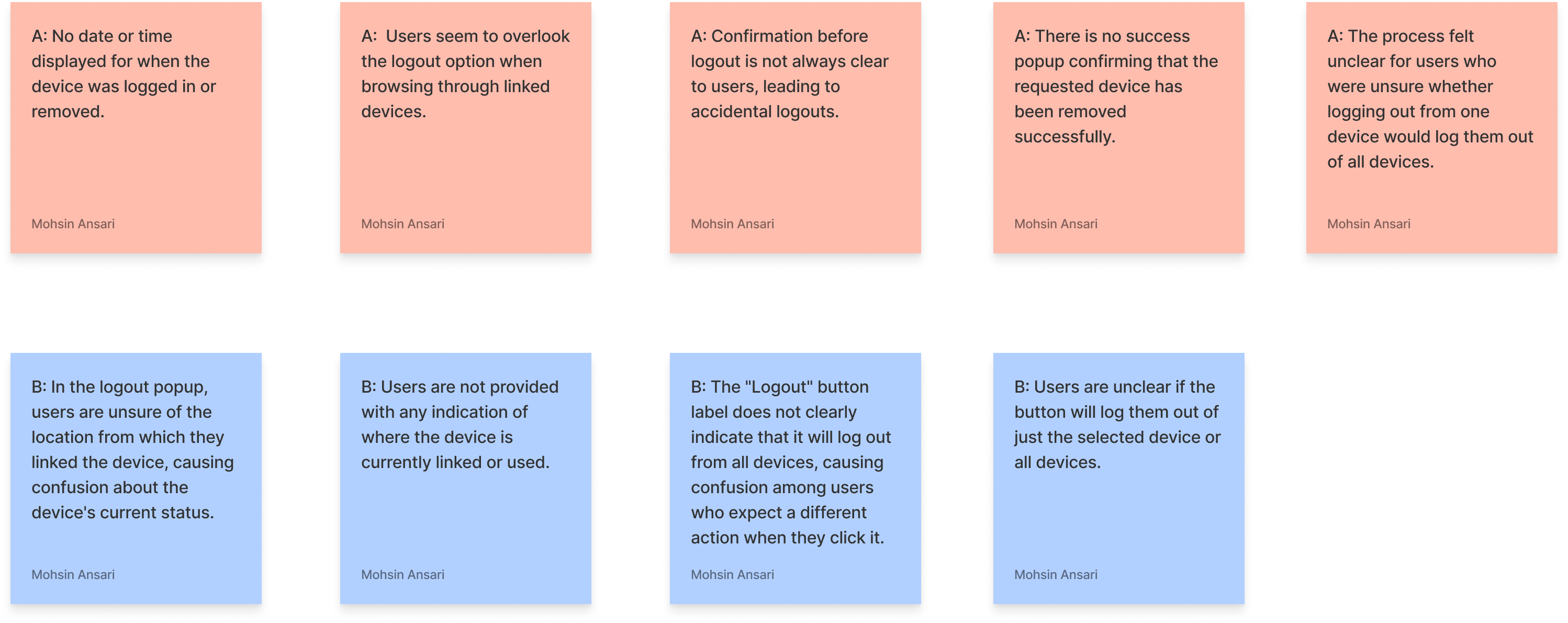
Pattern
Users, including Participant 1 and Participant 5, struggle with the absence of date and time information for when a device is logged in or removed.
Insight
Without date and time details, users are unsure about the status of their device sessions, leading to confusion.
Recommendations
- Show date and time of the last login and device removal.
- Include timestamps in confirmation messages for clarity.
Iterate Based on the Usability Testing
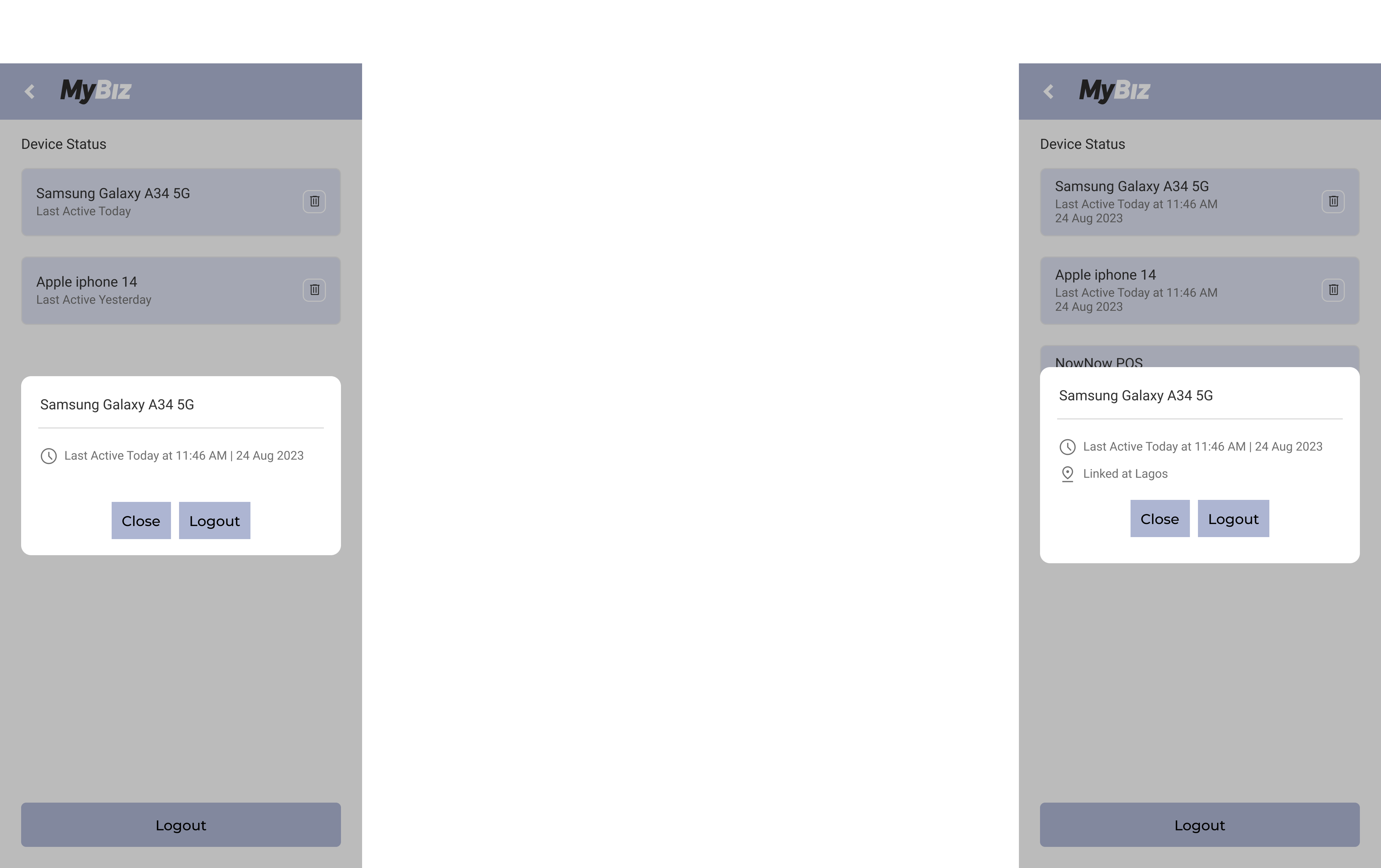
Insight 1: Without date and time details, users are unsure about the status of their device sessions, leading to confusion.
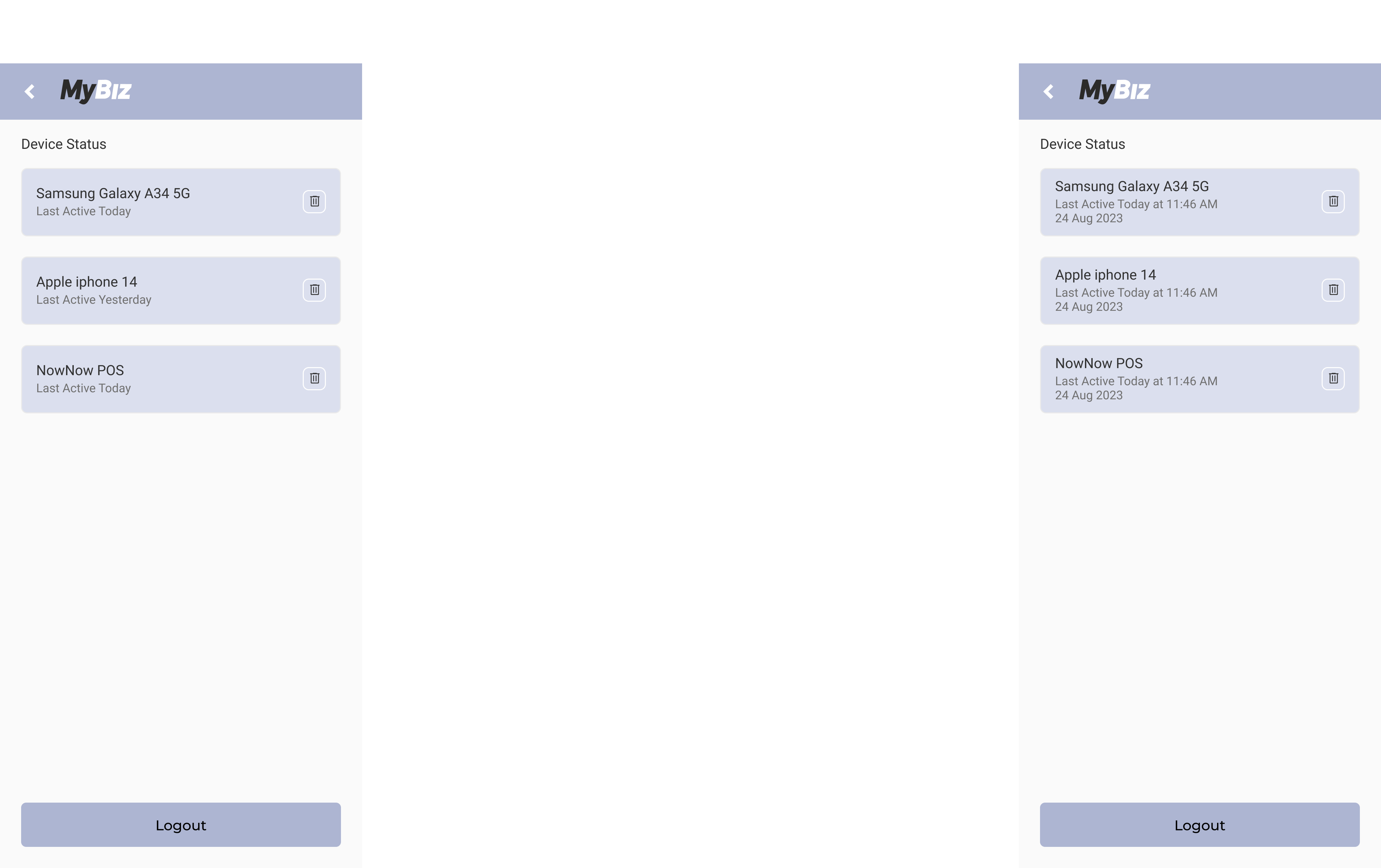
Insight 2: Unclear confirmation leads to unintended logouts, causing user frustration.
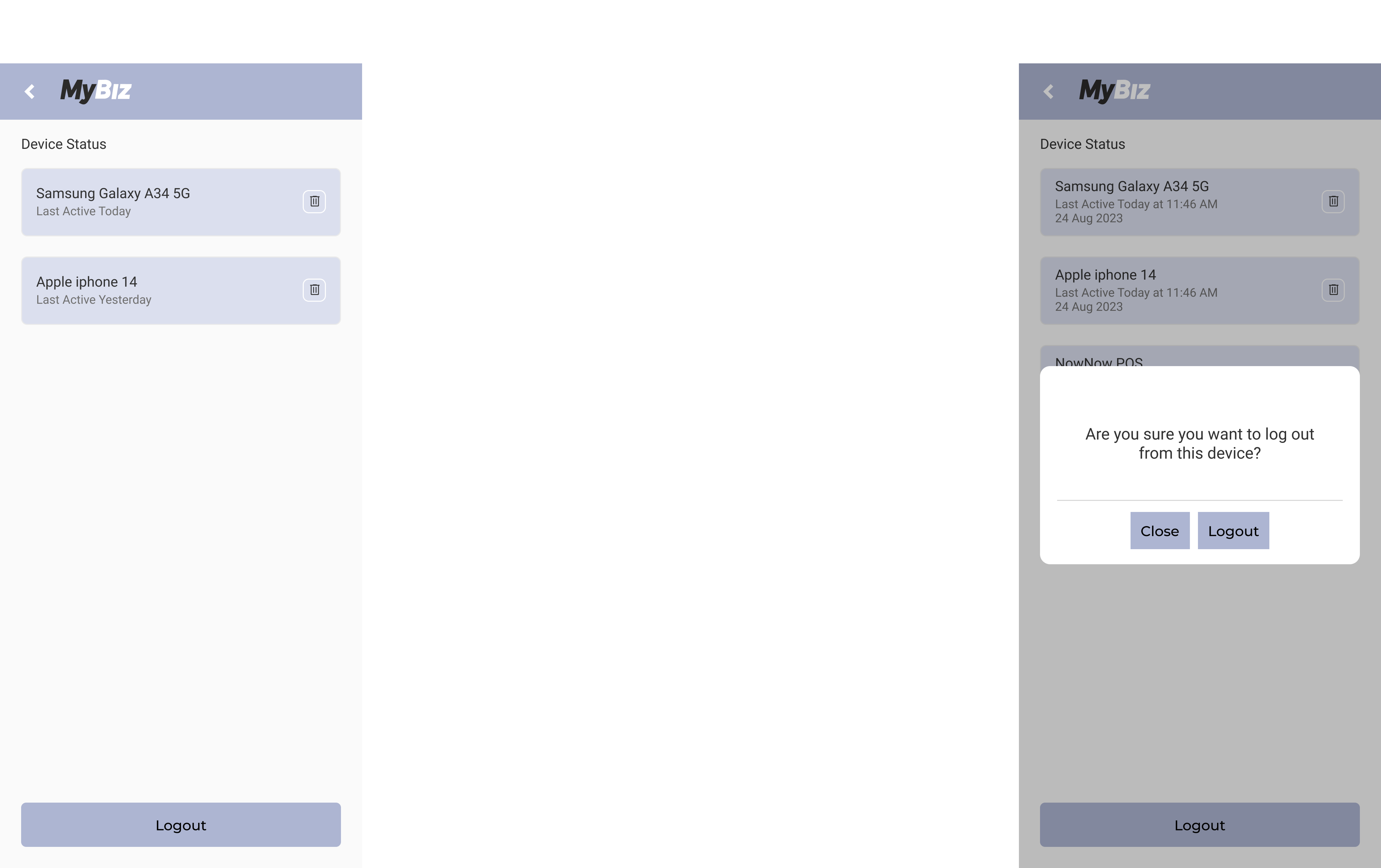
Insight 3: Users, including Participants 2 and 4, are unclear about the device's linked location in the logout popup.
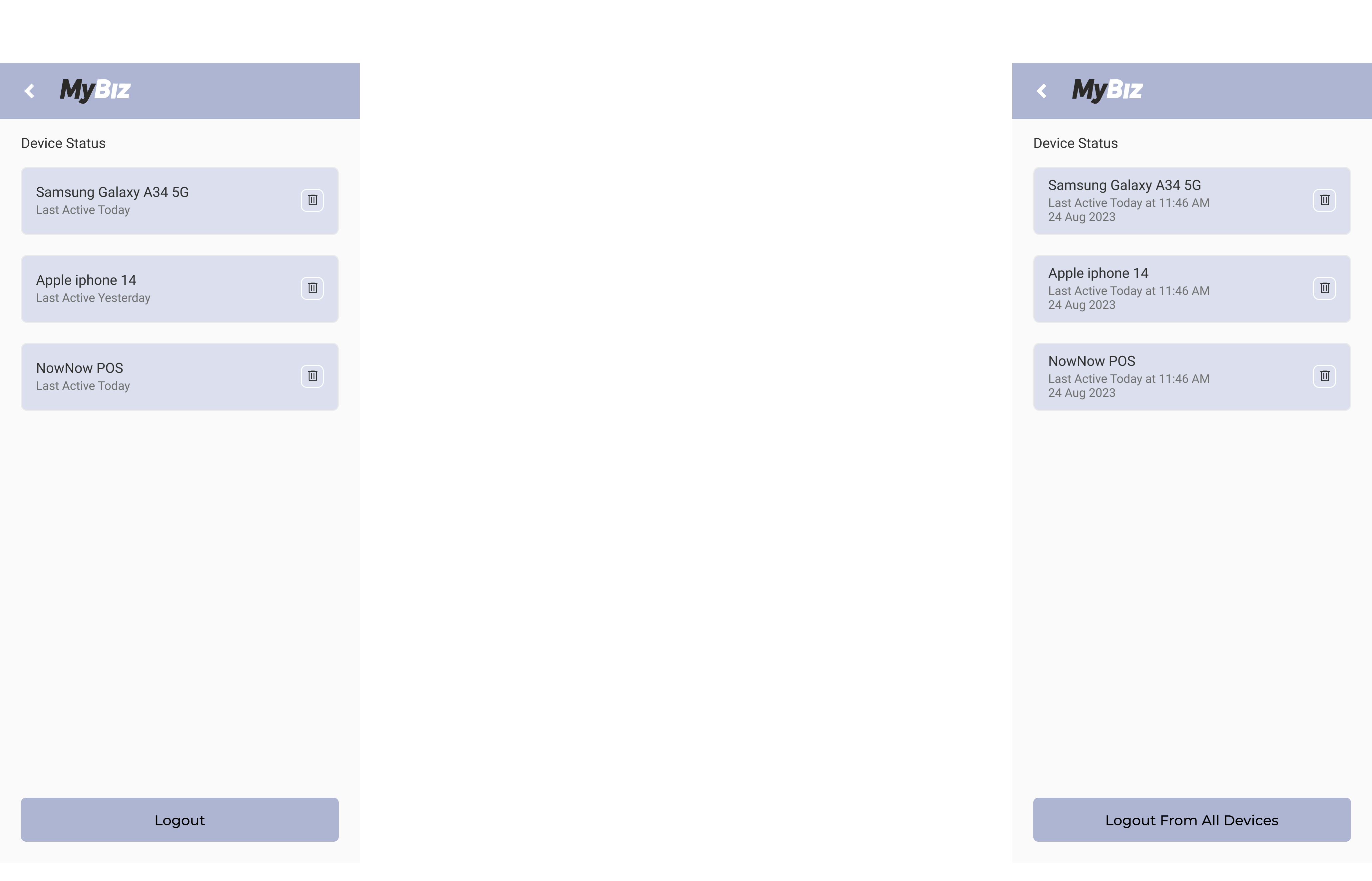
Insight 4: Users, including Participants 2 and 4, were confused by the "Logout" button label, not indicating it logs out from all devices.
Branding
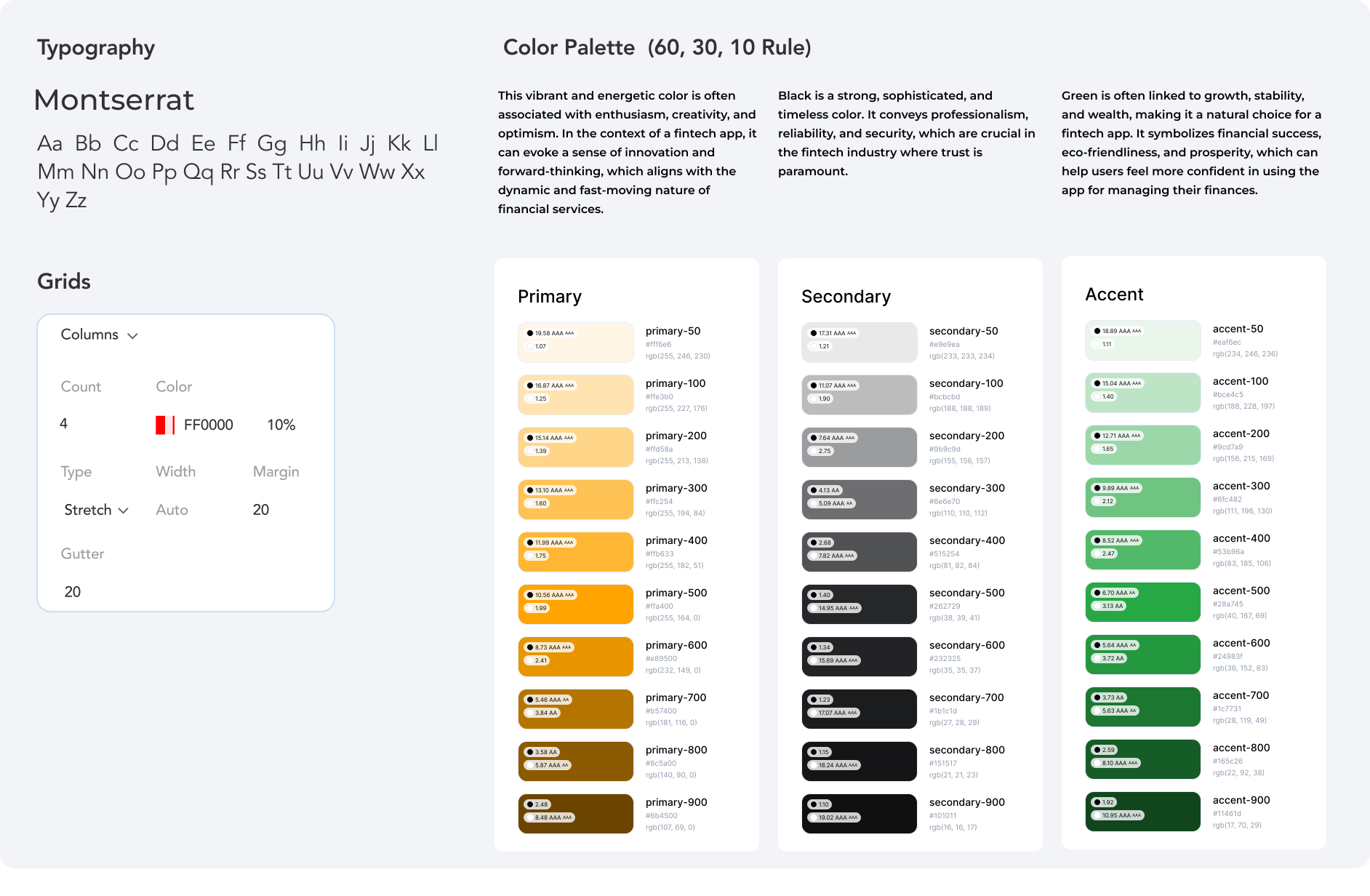
Branding in UX design accessibility involves ensuring that all elements of a brand's identity—visuals, tone, interactions, and emotional connections—are accessible to everyone, including people with disabilities. This approach not only adheres to ethical standards but also expands the brand's reach and inclusivity.
High Fidelity Designs
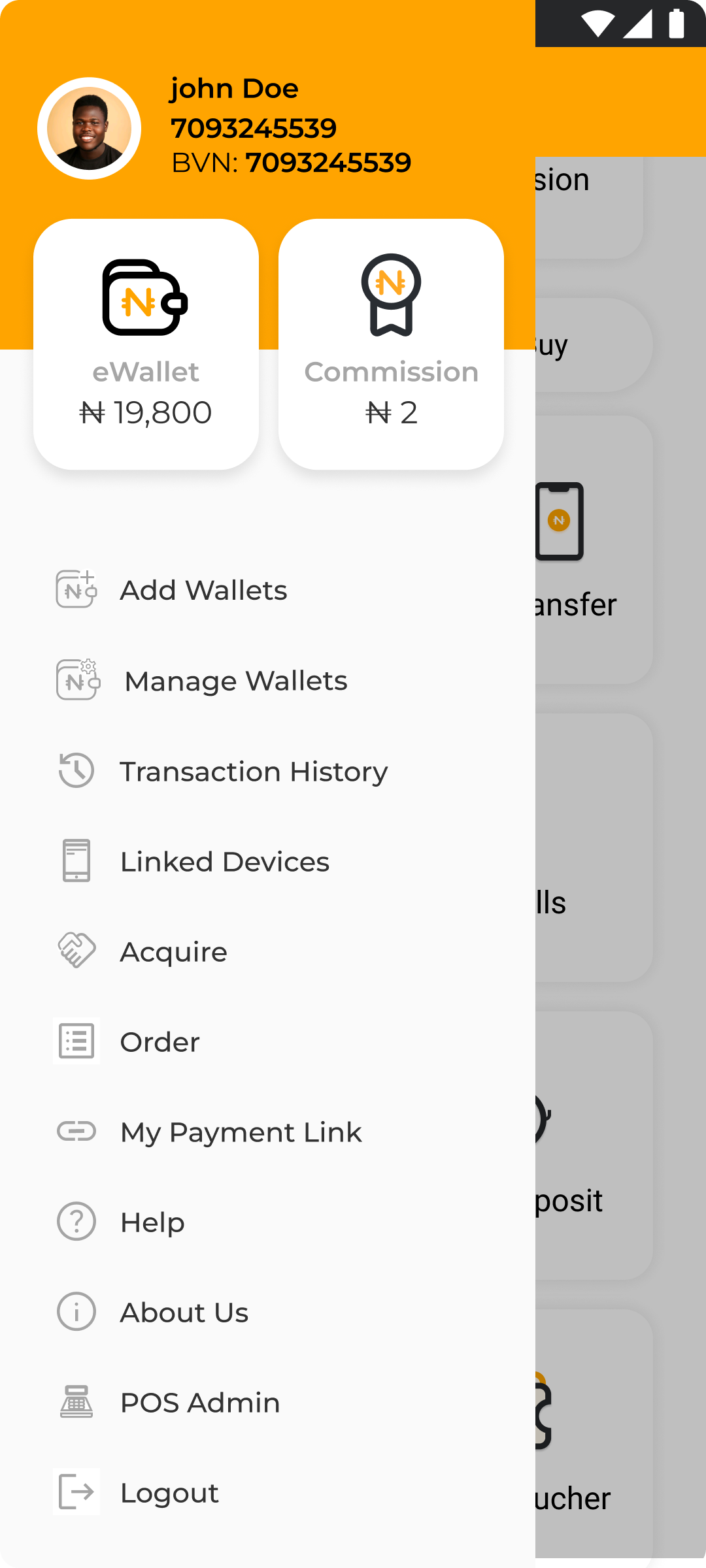
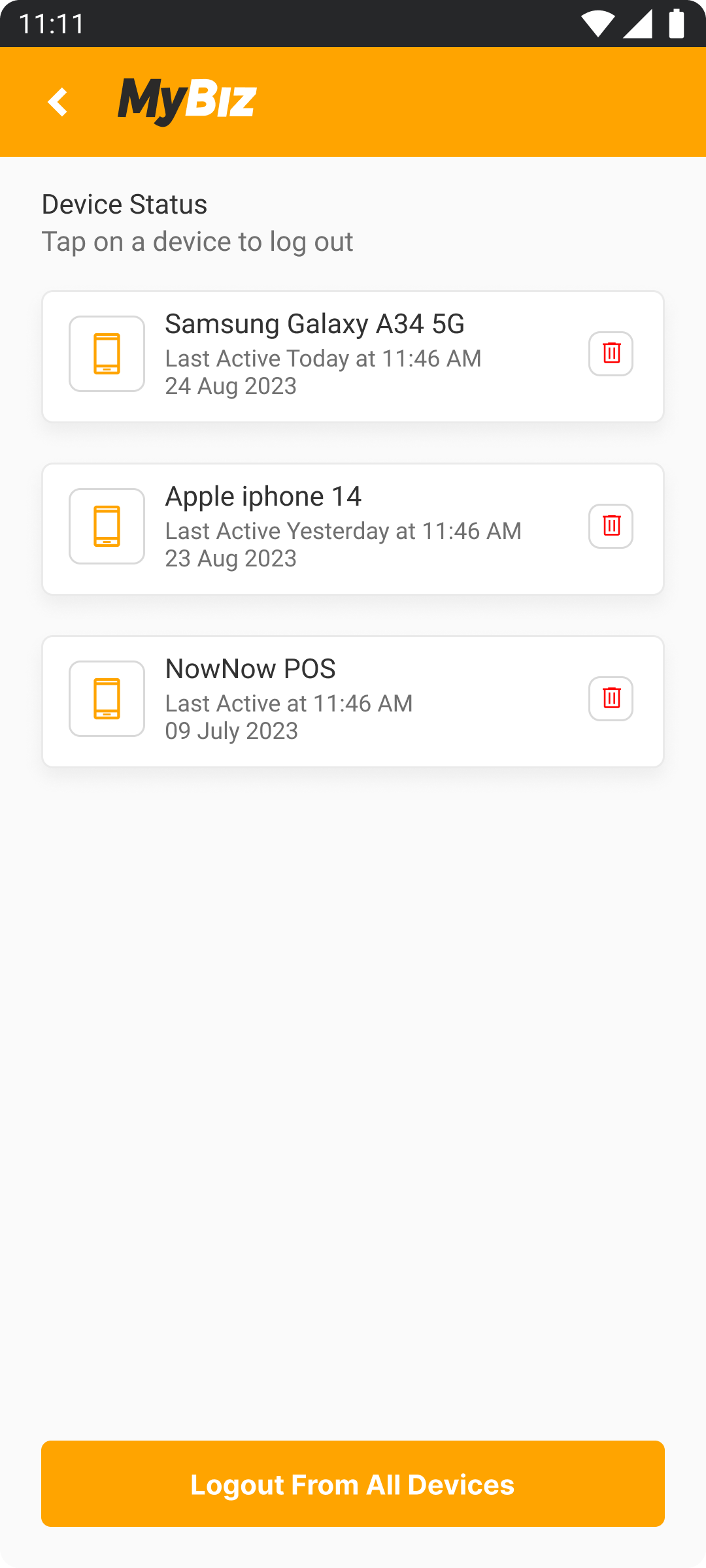
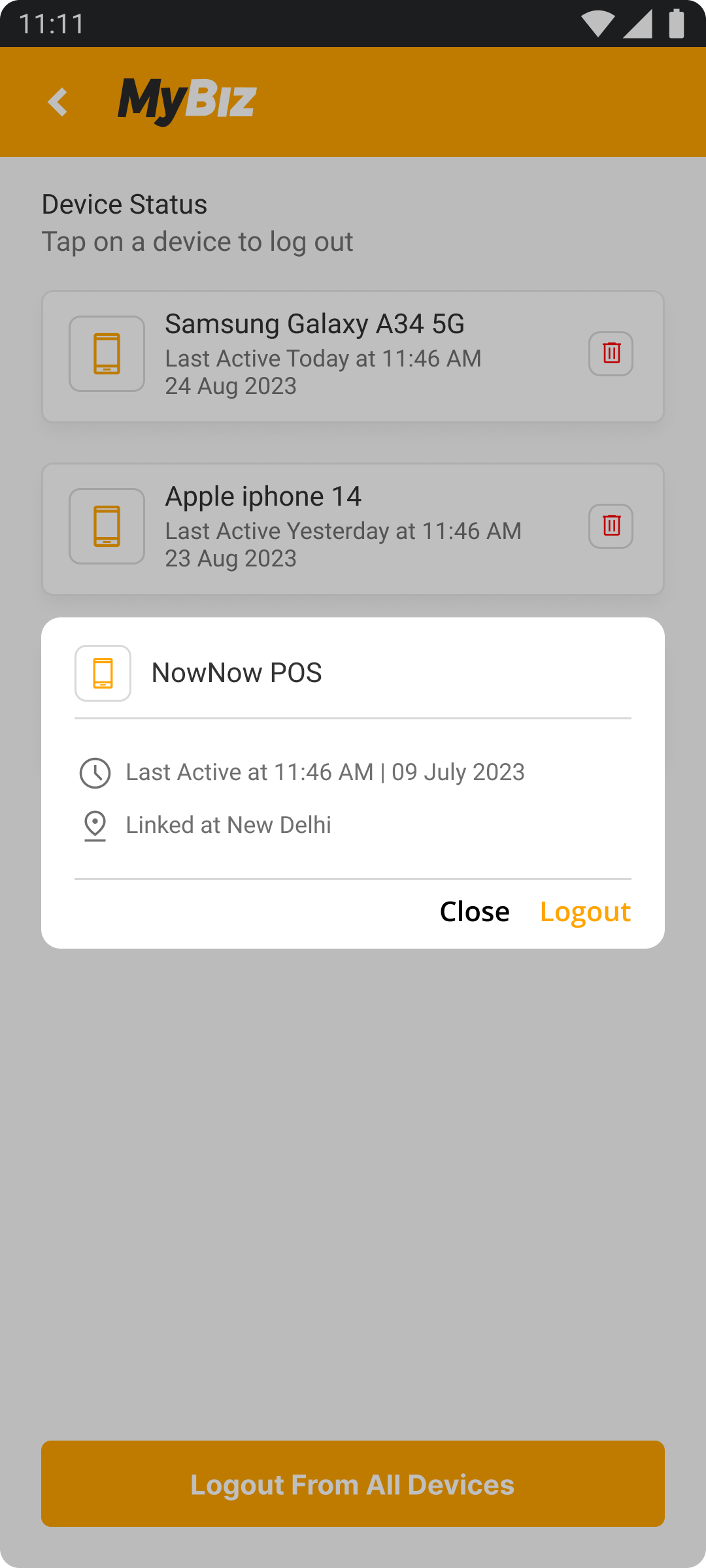
Impact on Business
Implementing the "Multiple Login" feature with clear logout options (single and all devices) will have the following positive impacts on the business:
Enhanced User Experience
Clearer labeling and confirmations will reduce confusion, leading to fewer user errors and frustration. This improvement in usability can increase user satisfaction and retention.
Increased Trust
Providing transparent notifications (e.g., success popups, device location details) will give users more control and confidence in managing their accounts, fostering trust in the app.
Reduced Customer Support Issues
By making the logout process intuitive and clear, users are less likely to require support for accidental logouts or confusion over device management, reducing the volume of support requests and operational costs.
Improved User Engagement
A more intuitive and seamless user flow encourages users to stay engaged with the app, as they feel more in control of their sessions and security settings.
Final Thought and Next Step
Final Thought
With the final prototype for the Multiple Login feature complete, I believe I have successfully met the initial design goals. I have developed a user-friendly system that allows users to easily manage their login sessions across multiple devices, ensuring clarity and control. If given more time, I would refine additional features to improve the user experience further and enhance the app's security options, adding more flexibility and competitive edge.
Next Step
Design Implementation & Handoff
With the Multiple Login feature design thoroughly tested and revised, it is now ready for the development phase. To ensure effective communication with developers, I have redlined and organized my design deliverables using Zeplin for handoff and am prepared to assist with any follow-up questions regarding the implementation of the feature.
Maintenance
Future updates and revisions will be managed based on priority levels, ensuring continuous improvement and alignment with user needs. These updates will focus on refining user flows, adding new login management options, and ensuring the feature remains secure and easy to use.
What i learned
In this project, I conducted user interviews, competitor analysis, created low-fidelity wireframes, linked prototypes, carried out a usability study, and designed high-fidelity UI screens. I gained significant insights and skills, but I recognize there is always room for improvement and further growth in this field.